Doprava zdarma od 1 999 Kč
Rychlá expedice
Ověřený obchod
Tisíce zákazníků




Doprava zdarma od 1 999 Kč
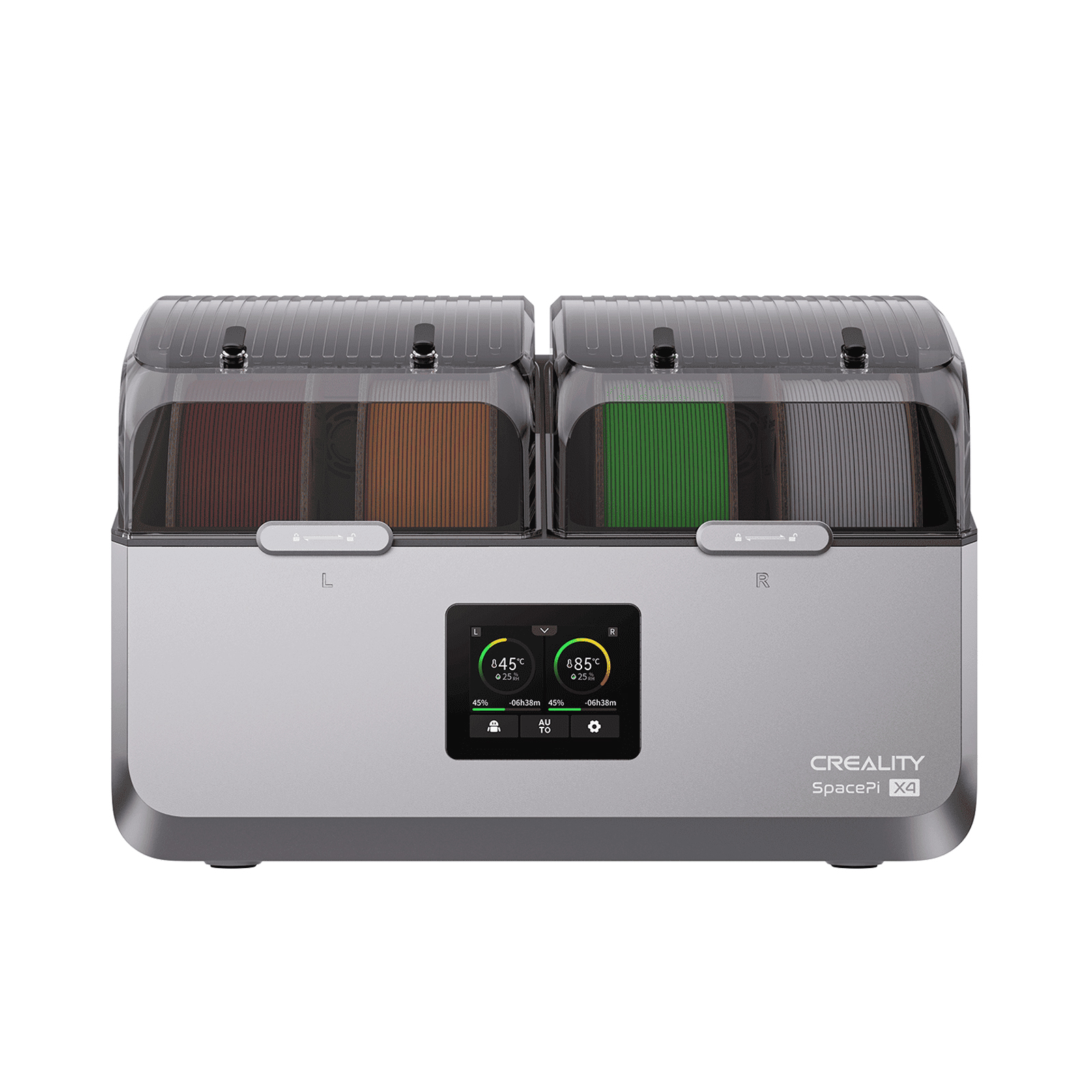
Filament can look completely fine and still ruin your prints. A few days in an open room, a more humid basement, a PETG spool left on the printer over the weekend, or TPU that has been sitting in a box for half a year is all it takes. Water absorbed by the material turns into steam in the hotend, disrupting extrusion: the material pops, creates bubbles, produces more stringing, and the finished part has a poorer surface and lower strength.
A filament dryer is not essential equipment for every beginner, but it is one of the most practical accessories when you want stable results. That is why we recommend the Creality Space Pi: it is simple, offers active hot-air drying, a display showing humidity and temperature, a timer, and a temperature range suitable for the most common materials.
Typical symptoms often look like an incorrectly configured slicer or printer:
One symptom alone does not necessarily provide certainty. However, if the same gcode prints well from a fresh spool and poorly from an open spool, drying is the first thing I would try. With PETG, TPU, PA, PC, and composite materials, it is often faster than endlessly adjusting temperature, speed, and retraction.
A dryer makes the most sense in three situations.
The first is printing materials that absorb moisture more readily. PETG, TPU, nylon, polycarbonate, and filaments filled with glass or carbon fiber can lose quality surprisingly quickly. With TPU and PETG, this often appears as stringing and a poorer surface; with nylon, part strength also drops significantly.
The second situation is long-term storage. If you have open spools at home for months, store them in a workshop or garage, or keep them in a room with fluctuating humidity, active drying before printing saves both time and material.
The third situation is long and important prints. With a twenty-hour print, you do not want to discover halfway through that the surface is deteriorating because the spool has been sitting in an open space the entire time. With more sensitive materials, it is a good idea to print directly from the dryer.
If you mainly print PLA, use up a spool within a few weeks, and seal it in a bag with silica gel after printing, a dryer is not the first thing you need to buy. PLA can also absorb moisture, but in a typical home it is usually more tolerant than PETG or TPU.
Even with PLA, however, a dryer is useful if the filament starts breaking, prints roughly, produces a lot of stringing, or you have several unpacked colors at home that are used only occasionally.

When choosing, focus mainly on practical features, not just the maximum temperature.


A sealed box with silica gel is excellent for storage, but it will not dry a wet spool quickly. For genuine drying, you need heating and airflow around the spool. Even circulation helps prevent only one side of the spool from heating up.
Lower temperatures are sufficient for PLA and TPU, PETG can usually tolerate more, and engineering materials often require a longer time or higher temperature. A practical range for typical home use is approximately 45 to 70 °C. With nylon and polycarbonate, always check the filament manufacturer's recommendations; some materials would ideally require a higher drying temperature than a typical desktop dryer can provide.
Drying takes hours. A timer is important because you do not have to monitor the end manually, and you can set the spool to dry in the evening before printing.

The hygrometer in the dryer measures the humidity of the air inside the box, not the amount of water directly in the filament. Even so, it is useful: you can see whether the dryer is removing moisture from the space and whether conditions remain low during printing.
If you print PETG, TPU, or nylon for extended periods, the ability to feed filament directly from the dryer to the printer is a major advantage. After drying, the material does not unnecessarily remain exposed to the air.
One spool is sufficient for most users. Two spools make sense for multicolor printing, printers with two materials, frequent color changes, or when you want to dry one spool while printing from the other at the same time.
The Creality Space Pi is a good choice for most FDM printer owners because it addresses exactly what is most commonly needed in practice: drying one standard spool, setting the temperature according to the material, monitoring humidity, and optionally printing directly from the box.
Main advantages:
In our view, the Space Pi is the most sensible recommendation for users who want to improve print quality without complicated tinkering. It does not take up much space, the controls are straightforward, and it covers the materials most commonly purchased in the e-shop for standard printers.
If you always print from one spool, choose the Creality Space Pi. If you often use two spools, dry material in advance, or operate a multicolor setup, choose the Creality Space Pi Plus.
Always follow the recommendation of the manufacturer of the specific filament. Treat the following values as a practical starting point, not an absolute rule.
| Material | Temperature | Time | Note |
|---|---|---|---|
| PLA | 45-50 °C | 4-6 h | Do not overheat, especially cardboard or thin spools. |
| PETG | 55-65 °C | 4-8 h | A common cause of stringing and bubbles. |
| TPU | 45-55 °C | 5-8 h | Extrusion is usually significantly more stable after drying. |
| ABS / ASA | 60-70 °C | 4-8 h | For larger parts, a properly heated printer chamber also helps. |
| PA / nylon | 70 °C | 8-12 h or more | Very sensitive to moisture; for demanding parts, check the manufacturer's recommendations. |
| PC | 70 °C | 6-12 h | Some types require a higher temperature; check the filament label. |
If the filament pops, foams, or the print still looks poor, extend the drying time. With a very damp spool, drying overnight is common. However, do not increase the temperature blindly, as you may deform the filament or the spool itself.
Drying and dry storage complement each other. The dryer removes water from the material, while a dry box or bag prevents the filament from quickly absorbing it again.
Do not rely on an oven unless you know exactly how well it maintains temperature. Household ovens often fluctuate, and a brief spike can be enough to soften PLA or deform a plastic spool.
Do not dry all materials the same way. PLA, TPU, and PETG do not require the same temperature as nylon. A temperature that is too low will only extend the drying time, while one that is too high can damage the material.
Do not expect to fix wet filament with retraction settings. A slicer can hide some of the stringing, but it cannot remove water from the material. If the filament hisses and bubbles in the nozzle, the solution is drying.
And finally: a dryer is not a substitute for correctly configuring the printer. If you have a poor first layer, a clogged nozzle, or an unsuitable printing temperature, drying alone will not solve everything. It is, however, a quick way to eliminate one of the most common causes of inconsistent quality.
You mainly need a filament dryer when printing PETG, TPU, nylon, PC, or composites, leaving spools open for a long time, or wanting greater certainty with long prints. It is not essential for ordinary PLA that is used quickly and stored properly, but even there it can rescue an older or brittle spool.
We recommend the Creality Space Pi as a simple and practical choice for most home and workshop printing. It offers active hot-air drying, a timer, humidity monitoring, and a temperature range that covers the most commonly used filaments. If you want less stringing, more stable extrusion, and fewer failed prints, it is an accessory that pays for itself very quickly.


