Livraison gratuite à partir de 1 999 Kč
Expédition rapide
Boutique vérifiée
Des milliers de clients



Livraison gratuite à partir de 1 999 Kč
Multicolor and multimaterial printing sound similar, but in practice they solve slightly different problems. Multiple colors are mainly about better-looking models: signs, figurines, logos, maps, labels, or gifts. Multiple materials are a functional matter: PLA with PETG supports, PETG with a TPU seal, a rigid part with a ible element, expensive technical material only on the surface and cheaper material inside.
That is why it is not just about the number of spools. What matters is how the printer changes materials, how much filament it wastes in the process, how much time it spends away from the actual print, and how closely you will need to monitor the system. As of June 2026, the situation is especially interesting because MMU3 has received a significant speed boost, INDX for Core One is no longer just a promise for the future, and classic toolchanger printers remain the most capable, but also the most expensive, option.
If you want to print in multiple colors today on a supported Prusa printer and are mainly concerned with a reasonable price, choose MMU3. It is the most practical choice for customers who want five colors, do not want to buy an entirely new printer, and are willing to spend time properly setting up the filament, buffer, and nozzle cleaning.
If you own or are planning to buy a Prusa Core One+ and want a more modern solution with less waste, keep an eye on INDX. It makes the most sense where multiple colors or materials will be a regular part of your work, not just an occasional novelty. However, expect gradual availability, a new ecosystem, and the fact that first-generation products are usually better suited to experienced users.
If you want to print functional material combinations, large models, soluble or breakaway supports, and do not want to deal with large purge towers, a toolchanger is the best option. It is typically more expensive, larger, and more complex, but for true multimaterial printing it is the cleanest approach.
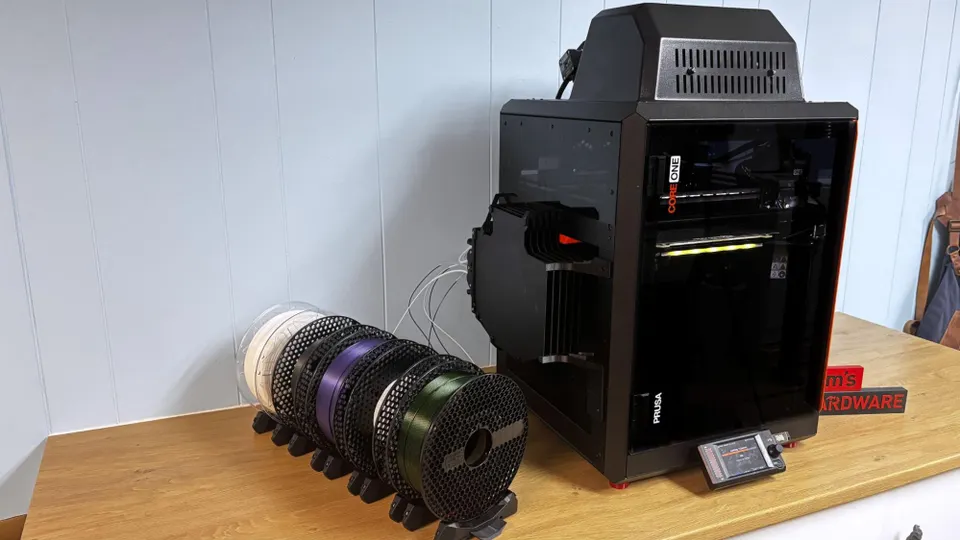
MMU3 is a single-nozzle system. Different filaments are fed successively into one print head. When changing color or material, the printer must pull out the old plastic, feed in the new one, and clean the remaining molten material from the nozzle. This is done using a purge tower, often called a purge tower or wipe tower. The advantage is lower cost and simpler hardware. The disadvantage is the time and waste involved in every change.
INDX is a hybrid approach for Core One+. It has multiple separate passive tools, each with its own nozzle and filament path, while the more expensive active components remain in a shared head. The tool is picked up, quickly heated by induction, and printing continues. The aim is toolchanger-like behavior in a more compact and affordable package. The main advantage is a significantly lower need for purging between colors and support for up to eight tools. The main risk is the system's novelty and gradual availability.
A classic toolchanger has its own print head or at least its own complete tool for each material. Each material has its own nozzle, extruder, and often its own settings. The printer parks the tools and picks them up as needed. It therefore does not need to flush a shared nozzle with every change. Usually, only a small priming operation is needed to stabilize the pressure in the nozzle. The advantages are low waste, fast changes, and the best compatibility with different materials. The disadvantages are the price, size, and additional mechanics that need calibration.
| Choice | Number of materials | Waste | Change speed | Price | Complexity | Best use |
|---|---|---|---|---|---|---|
| MMU3 | up to 5 | medium, depending on the purge tower | faster after the update, but filament is still being loaded | lowest of the three | medium | multicolor PLA and PETG models |
| INDX | up to 8 | very low | fast tool changes, fast heating | medium | currently more suitable for experienced users | Core One+ with frequent multicolor printing |
| Toolchanger | typically up to 5, depending on the system | very low | very fast changes | highest | higher | functional multimaterial printing and manufacturing |
MMU3 still holds a strong position. Its biggest advantage is the price-to-capability ratio. If you already have a compatible printer, you do not need to replace the entire machine. For multicolor signs, company logos, name tags, figurines, or five-color models, it is a sensible and affordable solution.
Current firmware from 2026 has shortened a typical filament change from approximately 52 seconds to around 42 seconds. This may not sound dramatic for a single change, but changes quickly add up in multicolor printing. A model with 400 changes saves approximately one hour. A highly detailed decorative model with thousands of changes can save several hours. That is the difference between printing overnight and printing into the following day.
However, MMU3 still uses a single nozzle. Every material change means feeding filament, cleaning the nozzle, and checking that the colors do not mix. Switching from black to white will require more cleaning than switching from dark blue to black. With transparent materials, even a small amount of the previous color can be a problem. When using expensive filaments, you need to account for some of the material ending up in the purge tower.
We therefore mainly recommend MMU3 for printing with similar materials. For example, PLA in five colors, PETG in several colors, or combinations where the materials have similar temperatures and behavior. On the other hand, combinations with large temperature differences, ible filament in a long loading path, or abrasive material alongside standard PLA require more experience.
Practical example: you want to print colorful workshop signs from PLA. MMU3 is a very good choice. You want to print a PETG box with a TPU seal directly in one print. MMU3 may be the more challenging option, while a toolchanger or INDX will make more sense.
INDX is most interesting for customers making decisions around Core One+. The system supports up to eight tools, each with its own nozzle and filament path. The active head picks up the tool, and the nozzle heats up by induction within a few seconds. This eliminates the main problem of a single shared nozzle: there is no need to flush remnants of the previous color from the same melting chamber.
This has a practical impact on both time and money. With a model containing many color changes, the biggest problem is not the cost of a few grams of waste itself, but the combined cost of waste and time. A purge tower takes up space on the build plate, extends the print, and on a small model can weigh surprisingly much compared with the finished part. If you print more frequently, the difference adds up quickly.
INDX also promises greater convenience when switching nozzles. One tool can have a small nozzle for detail, another a standard 0.4 mm nozzle for general-purpose printing, and another a larger nozzle for fast infill or sturdy fixtures. This is a major difference compared with single-nozzle systems, where changing the nozzle diameter means modifying the entire printer and its profiles.
The disadvantage is that this is a newer solution. Orders for Core One+ opened in 2026, and deliveries are expected to ramp up gradually. The first available configurations support 4 or 8 tools, and the kit costs considerably more than a simple multi-filament accessory, but significantly less than buying a large, full-fledged toolchanger. A later release is planned for Core One L and finished printers with preinstalled INDX.
INDX is therefore a good choice if you want to build around Core One+, expect to print in multiple colors regularly, and do not mind waiting for availability and the first real-world experiences from the wider community. If you need to produce orders immediately, it is more sensible to buy an available solution now.
A toolchanger is more expensive, but technically it is the most direct answer to multimaterial printing. Each material has its own tool. This means less contamination, less cleaning, faster changes, and better conditions for different materials.
This is convenient with colored PLA. With functional combinations, it is crucial. PLA supports under PETG can break away much more cleanly because these materials bond poorly to each other. TPU can be used for the ible part of a model while the rest remains made from a rigid material. Expensive technical filament can be used only where it makes sense, with the rest printed more cheaply.
A toolchanger also handles jobs with multiple parts on one build plate better. With one colorful figurine, a purge tower for a single nozzle may still be acceptable. With a batch of 30 small logos or labels, every additional change means time during which the printer is not producing a useful part. In such a situation, a toolchanger has a major advantage.
However, expect a higher initial budget and a larger machine. You also need to account for calibrating multiple tools, aligning nozzles, and properly configuring profiles. It is not necessarily difficult, but there are more variables. For a hobby user who occasionally prints a colorful sign, it is often an unnecessarily large investment. For a workshop, school, development department, or contract printing operation, it may instead be the most economical solution in the long run.
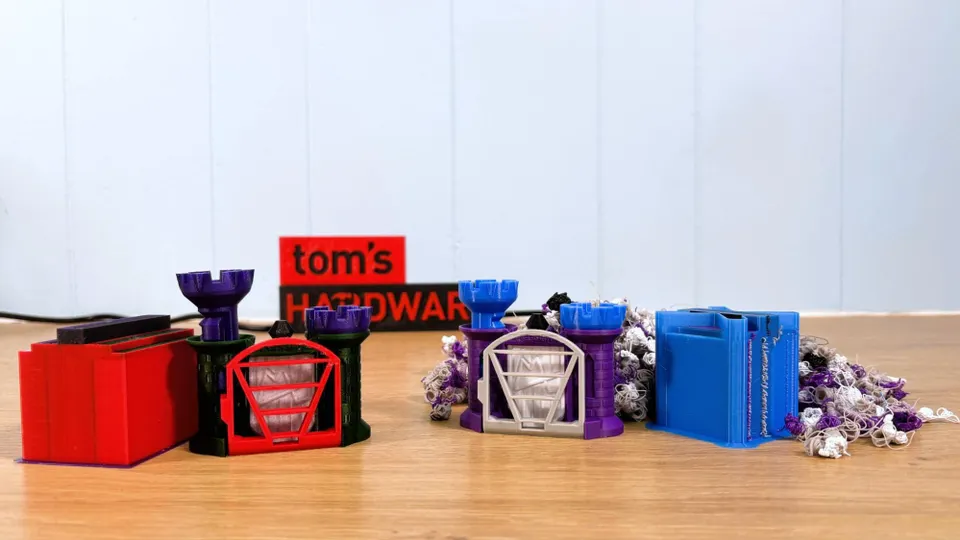
With a single nozzle, waste is created mainly during cleaning. If red PLA remains in the nozzle and the next section is supposed to be white, the printer must extrude enough plastic to prevent the white from becoming pink. This material ends up in the purge tower, in an object intended for cleaning, or in the infill if the model allows it.
You can reduce waste in several ways. Place similar colors next to each other if the model allows it. Print multiple identical parts at once, because the purge tower is spread across more products. Use purging into infill or into a sacrificial object if this does not compromise the appearance or function. With expensive materials, check the estimated consumption in the slicer in advance, not just the weight of the finished model.
With a toolchanger and INDX, waste is lower because the materials do not share the same molten path. Nevertheless, it may not be completely zero. The nozzle may be briefly pressurized or cleaned before use so that the first line of the next color is reliable. The difference is one of scale: instead of extensive flushing, it is usually a small stabilization step.
If you mainly print decorative multicolor PLA models, choose MMU3. It is affordable, mature, and after the firmware speed increase makes very good sense for many customers. It is best suited to users who work with high-quality, dry filament and are willing to fine-tune profiles for clean transitions.
If you are buying a Core One+ and know that multiple materials will be an important part of your work, consider INDX. It is a more modern approach with less waste and a larger number of tools. It makes sense for users who want room to grow in the future but do not immediately need a large, more industrial machine.
If you print functional material combinations, customer orders, development prototypes, or want high throughput, choose a toolchanger. It is more expensive, but where purge towers would consume hours and filament, the investment pays off through lower consumption, shorter print times, and a lower risk of material contamination.
If you are not sure, start by asking what you will print most often. One multicolor model per month does not justify a complex system. Regular production of multicolor parts or combinations of PLA, PETG, and TPU does. With multiple materials, you are not paying only for the hardware. You are also paying with time, waste, workspace, and the attention you need to give the printer.
MMU3 is currently the best affordable entry point into multicolor printing. INDX is a very interesting direction for Core One+ owners who want less waste and up to eight tools in a compact machine. A toolchanger is the best choice for customers who are serious about multimaterial printing and care not only about colors, but also about material properties.
The cheapest solution is not always the least expensive to operate. If a model contains hundreds or thousands of changes, the purge tower and change time may be a larger expense than the difference in accessory price. Conversely, if you only print occasional colorful signs, a full-fledged toolchanger will be an unnecessary luxury. The right choice is the one that matches your models, not the highest number of spools listed on the box.


