Δωρεάν αποστολή από 1 999 Kč
Γρήγορη αποστολή
Επαληθευμένο κατάστημα
Χιλιάδες πελάτες




Δωρεάν αποστολή από 1 999 Kč
INTRODUCTION
We have divided the FAQ for A1 mini into three sections: product specifications, product features, and product usage.
PRODUCT SPECIFICATIONS
What materials can A1 mini print?
A1 mini is capable of printing a wide range of materials available on the market that do not require an enclosure. These materials include PLA, PETG, TPU, and their corresponding support filaments. It is not recommended to print filaments such as ABS, ASA, PC, PA, and PET, which require higher temperatures, build plates, and chambers.
What is the maximum nozzle/heated bed temperature?
The maximum nozzle temperature for A1 mini is 300 ℃, while the maximum heated bed temperature is 80 ℃.
What is the maximum build volume of A1 mini?
180 * 180 * 180 mm³.
Is the nozzle made of stainless steel or hardened steel?
The printer comes with a pre-installed 0.4 mm stainless steel nozzle. Additional nozzles will be available for purchase in our official store, including a 0.2 mm stainless steel nozzle and 0.4 mm, 0.6 mm, and 0.8 mm hardened steel nozzles. If you need these nozzles, you can conveniently purchase them in our official store.
How quiet is A1 mini during printing?
In Silent mode, the operating noise level of A1 mini is approximately 48 dB.
What is the power consumption of A1 mini in printing and idle modes?
A1 mini consumes approximately 6 W of power when idle and an average of 57 W during printing. However, please note that power consumption may be significantly higher when the printer is heating the bed and nozzle from room temperature during printing.
PRODUCT FEATURES
How can I level the bed?
Our printer supports automatic bed leveling. We recommend checking the heated bed leveling option before starting a print. The algorithm quickly checks five points to determine whether the bed needs to be leveled again or whether the previous leveling data can be used. Therefore, it is not necessary to level the bed manually.
Is bed leveling necessary before every print?
We strongly recommend enabling the automatic bed leveling function before every print, because magnetic build plates may not be placed in exactly the same position after each print. Before automatic bed leveling, the printer quickly tests five points to determine whether the bed needs to be leveled again or whether the previous leveling data can be used.
How does flow calibration work?
During the nozzle cleaning process on the nozzle wiper, the hotend detects changes in extrusion force and uses this information to calibrate the K value.
What happens in the event of a partial nozzle clog? A partial nozzle clog may result in an incorrect K value. However, the good news is that future firmware updates will include support for manual flow dynamics calibration. Please refer to the firmware release notes for the A1 series.
Is dynamic flow calibration necessary before every print?
To ensure optimal print results, it is recommended to calibrate the following aspects (although it is highly recommended to keep them consistent for every print):
Does the AMS lite filament hub contain a Hall effect sensor for each filament inlet?
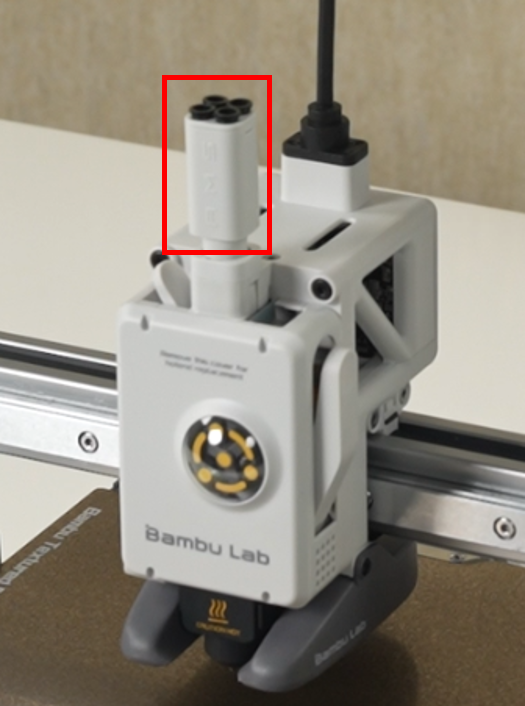
No, the AMS lite filament hub is a purely mechanical structure without any electronic components. It is not equipped to identify the specific slot from which the current filament is being used. In order for the printer to determine the slot from which the current material is being fed, it independently verifies the filament position each time it loads or unloads it. For more details, please refer to the AMS lite introduction.
PRODUCT USAGE
Is it suitable to print CF filament using A1 mini?
The A1 mini printer comes with a pre-installed 0.4 mm stainless steel nozzle. It is not recommended to use stainless steel nozzles for printing materials containing carbon fibers or glass fibers, such as PLA-CF/GF, PETG-CF/GF, etc., to minimize excessive nozzle wear. However, if you replace the nozzle with a hardened steel nozzle, you can print carbon fiber-based filaments on A1 mini. If you intend to use A1 mini with AMS lite, make sure you follow the filament requirements specified for AMS lite.
Can I use AMS with A1 mini?
No, AMS is not compatible with A1 mini. To achieve multicolor printing with A1 mini, you need to use AMS lite.
What are the best positions for placing A1 mini and AMS lite?
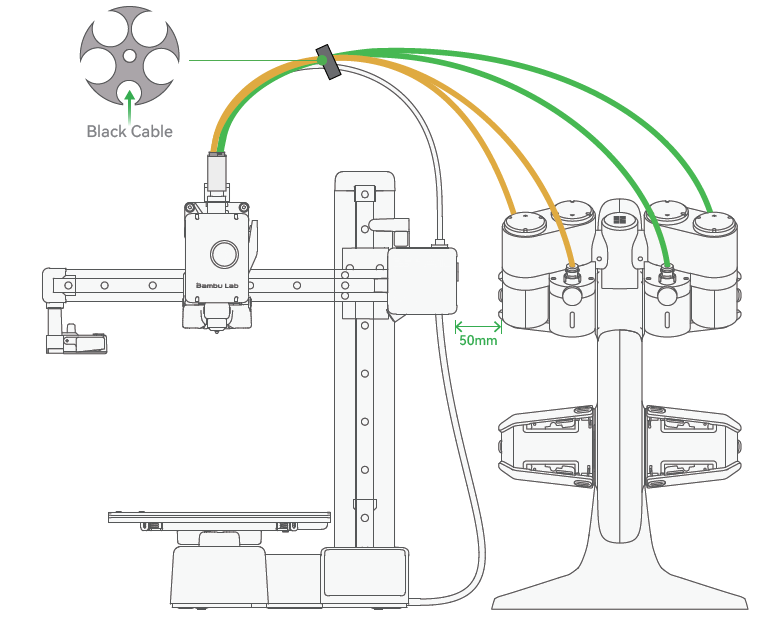
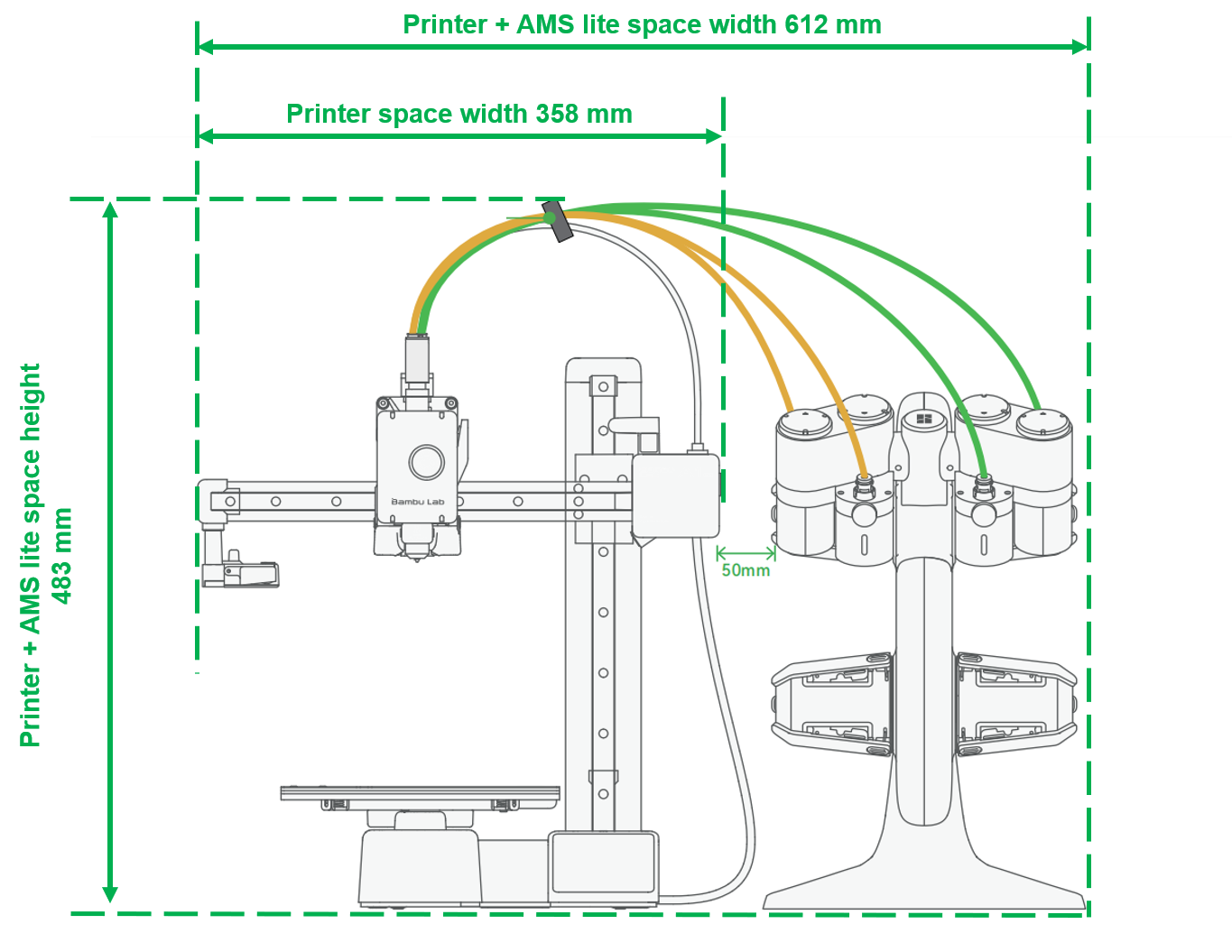
The recommended distance between A1 mini and AMS lite is 50 mm.
Using multiple AMS lite units with A1 mini to print up to 16 colors?
A1 mini supports only one AMS lite unit, allowing printing with a maximum of 4 colors.
Why does A1 mini have an additional 4-pin connector if it supports a maximum of one AMS lite unit?
This connector is reserved for future product expansion and/or additional functions.
How should the PTFE tubes be oriented to minimize resistance?
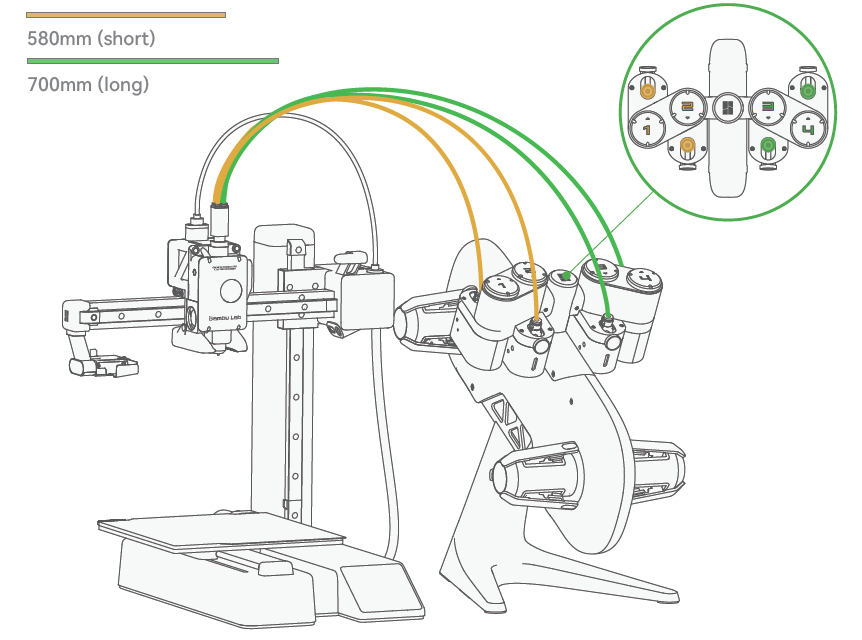
Insert the shorter 580 mm PTFE tubes into slots 1 and 2 and the longer 700 mm PTFE tubes into slots 3 and 4. At the same time, insert the other ends of the PTFE tubes in slots 1 and 2 into the two slots on the left side of the filament hub, while slots 3 and 4 should be inserted into the two slots on the right side of the filament hub (when viewing the printer from front to back).
What are the total space requirements for the X, Y, and Z axes for A1 mini + AMS lite?
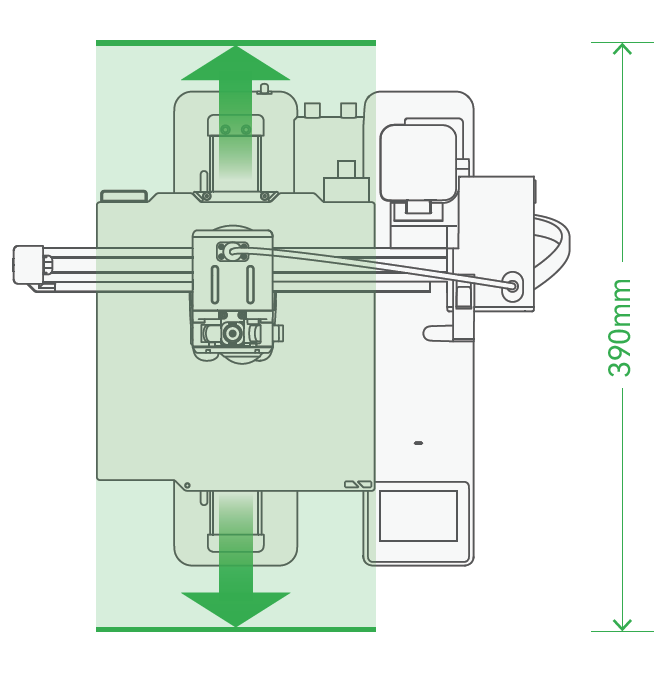
How much space should be reserved for the A1 heated bed to move back and forth along the printer?
As shown in the diagram, when positioning the printer, leave sufficient safe space for the heated bed to move in the Y direction, approximately 390 mm.
What is the recommended ambient temperature for the A1 mini printer?
The recommended ambient temperature for the A1 mini printer is 10-30 degrees Celsius.
What build plates are available for printing on A1 mini?
A1 mini supports both a textured PEI plate and a smooth PEI plate. The textured PEI plate is included among the accessories you receive when unpacking the printer. If you prefer a smooth PEI plate, you can purchase one in our official online store.
What materials can be printed on a textured PEI plate?
The textured PEI plate allows printing a wide range of materials, such as PLA, PETG, and TPU, without glue. After printing is complete, it is recommended to let the plate cool completely before removing the printed model. To maintain optimal adhesion, it is recommended to clean the plate with warm water and ordinary soap.
What materials can be printed on a smooth PEI plate?
The smooth PEI plate has a flat surface and allows printing materials such as PLA, PETG, and TPU. This printing surface is particularly suitable for printing PLA without glue. However, when printing PETG and TPU, it is necessary to apply glue in liquid or solid form.
Can the smooth PEI layer on the build plate be replaced as with the X1 and P1 series?
No, the smooth PEI layer on the build plate is not replaceable.
Can A1 mini print without a microSD card and use only Bambu Studio/Handy?
No, A1 mini does not have built-in memory, so a microSD card must be inserted to start a print. The printer comes with a pre-installed 32 GB microSD card.
What is the maximum size and format of the microSD card that A1 mini can use?
A1 mini supports microSD cards up to 2 TB in size if formatted using the option in the printer. For more information about microSD cards, please refer to this microSD card FAQ page.
What does the white LED on the printer body above the display mean?
A flashing white LED indicates the presence of messages from the AI assistant that require attention, while a steady white light indicates a normal system status.
How can I adjust the printing speed on A1 mini?
You can set the printing speed in Bambu Studio when slicing, on the speed page. During printing, you can change the speed modes (Silent, Standard, Sport, Ludicrous) directly on the printer, using Bambu Handy, or in Bambu Studio. It is important to note that Sport and Ludicrous modes require higher nozzle temperatures to achieve the best results, so we recommend setting a higher temperature in the slicing software.
How does the printer respond when the filament runs out?
A1 mini uses a Hall effect filament sensor to detect filament runout. It supports filament runout detection and allows printing to resume after the filament is replaced. When used with AMS lite, A1 mini can be configured to switch to backup filament when the current filament runs out.
How does the printer respond to a power outage?
After turning the printer back on, you have the option to resume printing after a power outage. This function allows the printer to continue and complete the interrupted print job.
Can all A1 mini speaker sounds be turned off?
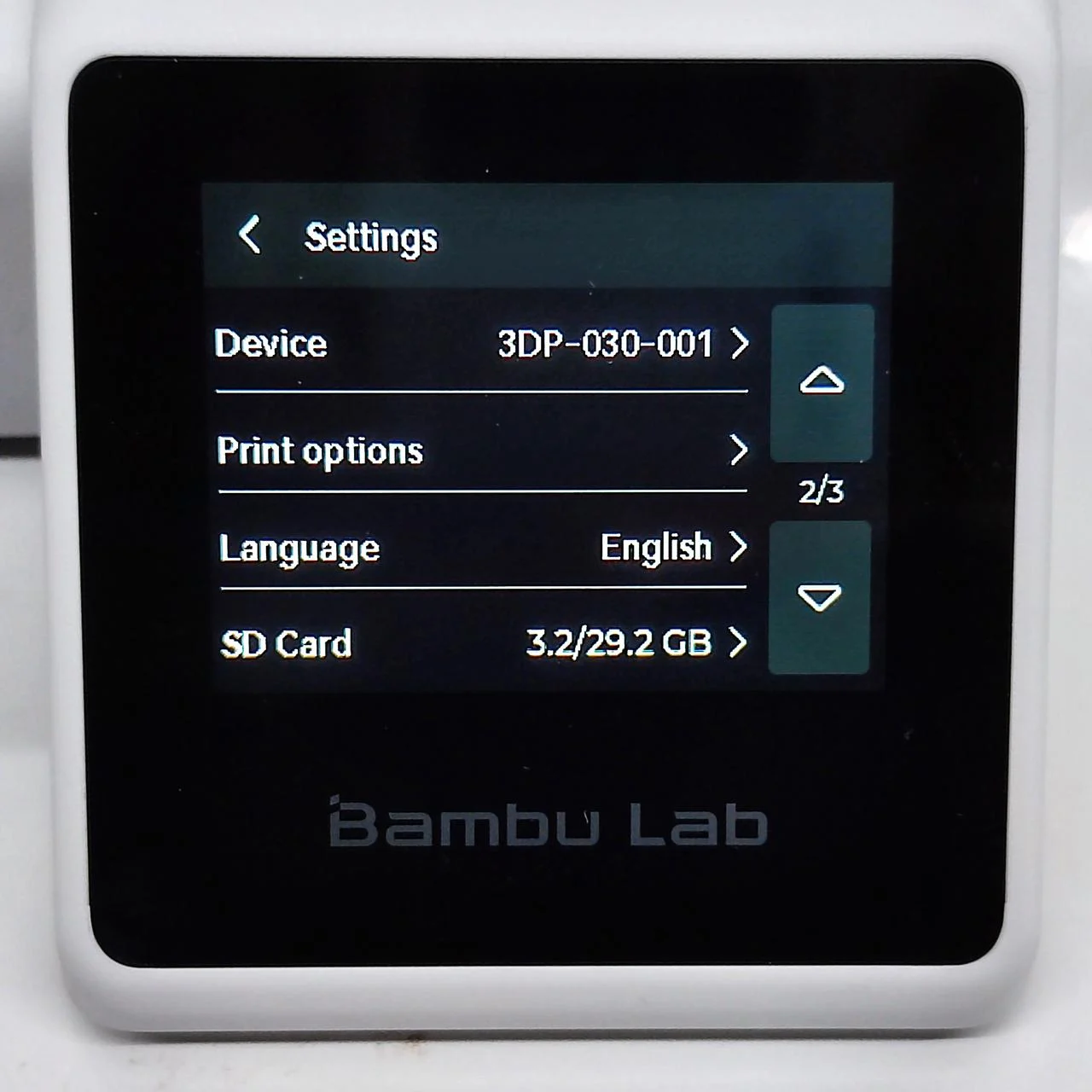
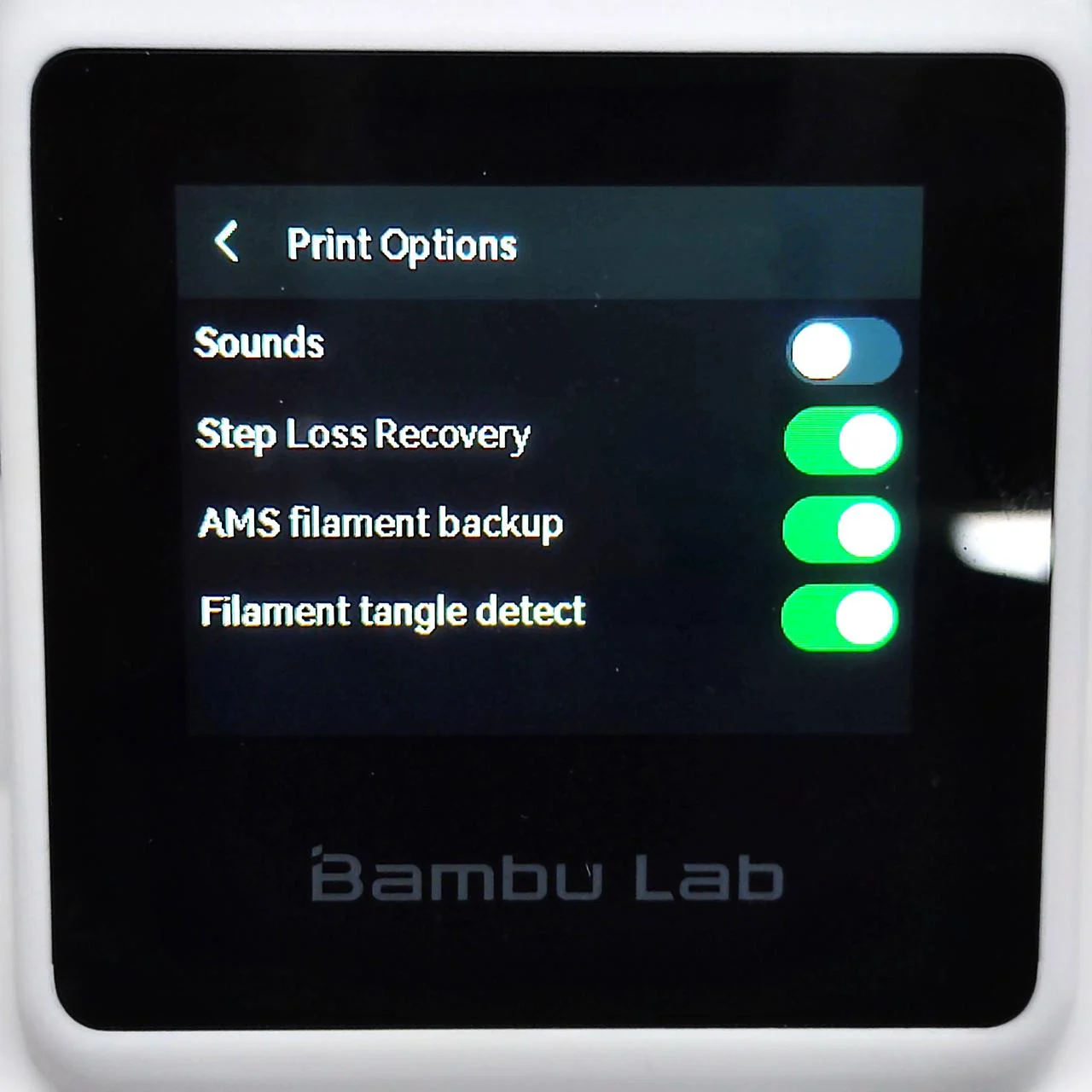
Yes, the sounds can be turned off in the printer settings.
Is pausing at a specific layer height available?
Yes, pausing at a specific layer height is available and can be performed in Bambu Studio.
Is a spool holder included if the customer did not purchase a set with AMS?
The A1 mini accessories include a spool holder, which must be installed by the user after unpacking the printer. Please refer to the A1 mini unpacking guide.
What is the flow rate when printing TPU?
We have a TPU printing guide available where you can find more information. We also recommend referring to our filament guide for more detailed filament parameter settings.
Where is the best place to position the purge tower?
The best place to position the purge tower is near the nozzle wiper – on the left side (this minimizes waste or scratches on the plate or axes and saves time during tool changes when changing filament).
Is it okay to enclose A1 mini in a cabinet?
We do not recommend enclosing A1 mini in a cabinet.
What is the firmware update process?
Firmware updates will be released regularly to add new features and fixes to the software running on the machine. The printer will check the cloud for available updates and display a pop-up notification when updates are available.
Does A1 mini support automatic recovery after a step loss?
Yes, A1 mini supports automatic recovery after a step loss; this function can be enabled on the print options page.
Is there a proper tool for removing tubes from the toolhead?
If you find removing the PTFE tube from the toolhead inconvenient, you can print this model to help with the operation.
How can I turn off sound effects before and after printing?
Sound effects can be turned off in the menu ‘Main Menu – Settings – Print Options.’
How do I install the heated bed scraper blade?
For installation instructions, I recommend watching the installation video.
Can you use the printer without any internet connection?
Yes, you can start a print from a microSD card. Please refer to the Wiki guide Printing from a Micro SD card.
Please note that the device firmware cannot be updated without a Wi-Fi connection.


